Guests Exceeding Max Nights
Report parameters
|
Field |
Description |
|---|---|
|
Report Name |
The name of the report. |
|
From Date |
The date from when the guest exceeding maximum nights report must be generated. |
|
To Date |
The date until when the guest exceeding maximum nights report must be generated. |
|
Report Options |
Available options include the following:
|
|
Room Type |
A drop-down list consisting of all the room types. Users can select multiple or all the room types from the list to be displayed in the report generated. The room can also be searched by entering the room number. |
|
Include Non-Bedded Rooms |
When enabled, the system includes non-bedded rooms associated with the available room types in the report. |
|
Sort Options |
Available options include the following:
|
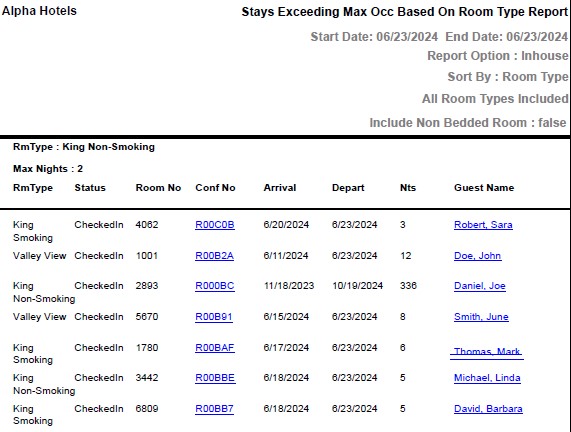
Sample Report
Report Fields
|
Field |
Description |
|---|---|
|
Max Nights |
The maximum number of contiguous nights allowed for each room type. |
|
RmType |
The room type to which the room number belongs. |
|
Status |
The check-in status of the guest. |
|
Room No |
The room number of the guest. |
|
Conf No |
The confirmation number of the reservation will appear as a hyperlink and clicking it will navigate the user to the reservation record. |
|
Arrival |
The date of arrival of the guest. |
|
Depart |
The date of arrival of the guest. |
|
Nts |
The number of nights for which the reservation is made. |
|
Guest Name |
The first name and the last name of the guest will appear as a hyperlink and clicking it will navigate the user to the guest record. |